

Introduction:
During Week 1, students were introduced to the basic ideas of programming and algorithms. In Week 2, they begin hands-on coding by learning C++, which is the core language taught in the Programming Fundamentals (PF) course.
This week covers:
- An overview of the C++ programming language
- Creating and running your first C++ program
- Main Header FIles
- Reading input from the user
- Printing output to the console
Together, these topics build the essential base required for more advanced programming concepts later on.
What basically C++ is?
C++ is a versatile, high-level programming language commonly used for building:
- System-level software
- Desktop-based applications
- Video games
- Embedded and real-time systems
- Solutions for competitive programming
It enables developers to create programs that are efficient, well-organized, and high-performing.
Why we choose C++ for PF course on Graduation Level?
C++ is chosen for the Programming Fundamentals course because:
- It helps students grasp essential programming principles
- It supports both procedural and object-oriented approaches
- It provides low-level access to memory, improving understanding of performance
- It is widely recognized and used in both academic and professional environments
Some Key Characteristics of C++ are:
C++ has many characteristics that’s why teachers choose it to teach in PF course for Semester 1 students. These are:
- High execution speed
- Support for structured program design
- Extensive standard libraries
- Platform independence across many systems
- Direct control over hardware and system resources
C vs C++:
On the selection of C++ as PF course of semester 1 a common question arise in the minds of students that Why we use C++ and why we won’t choose C? So, the simple answer is below:
“C and C++ are closely related programming languages, but they differ significantly in their approach and capabilities. C is a procedural programming language, which means it focuses mainly on functions and a step-by-step execution of instructions. It does not support advanced concepts such as classes and objects, making it suitable for low-level and system-oriented programming. On the other hand, C++ is an extension of C that supports both procedural and object-oriented programming (OOP). It introduces powerful features like classes and objects, which help in organizing code more efficiently, improving reusability, and making large programs easier to manage. Due to these features, C++ provides better data security and structure compared to C, which is why it is preferred for teaching Programming Fundamentals at UET and for developing complex software systems.“
Code Editor:
Now after coming out from all these things a simple question pop in our mind that How we can write our C++ programs and how we can make our machine to understand this code? The simple answer is We’ll use IDE(Intergrated Development Environment).
One can download Code Editor for C++ name DEV CPP from our website. Also its some important features and pros and cons available there and complete Documentation and Set Up guide is available there one can easily get and the link is below:
Basic C++ Program:
A basic C++ programs looks like:
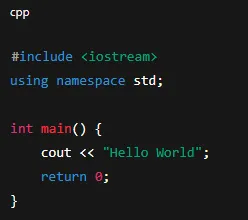
#include <iostream>- It is a header file
- Required for input and output
- Provides access to
cinandcout
- using namespace std
stdis a standard namespace- Avoids writing
std::coutandstd::cinagain and again - Makes code simpler for beginners
- int main()
- Execution of the program starts from main()
intmeans it returns an integer value to the system
{ }(Curly Braces)- Define the body of the program
- All executable statements are written inside braces
What are Header File?
A header file in C++ is a file that holds declarations for functions, classes, variables, and constants that can be used in a program. Instead of writing everything yourself, header files allow you to access built-in features and reusable code.
Header files usually end with the .h extension and are added to a program using the #include statement.
E.g.
<iostream><cmath><iomanip><string><cstdlib><ctime><fstream>
Why is this important in our program?
In C++, #include <iostream> is a command that tells the computer to add a ready-made file to your program before it runs.
The word iostream means input and output. This file helps the program take input from the user and show output on the screen.
By using <iostream>, we can use commands like:
cinto take inputcoutto display outputcerrto show error messages
If we do not include <iostream>, the compiler will not understand these commands, and the program will show errors.
- They help keep programs well-structured
- They promote code reuse
- They make programs easier to read, write, and maintain
What is Standard Namespace?
The line using namespace std; tells the compiler that the program will use standard C++ names without writing std:: again and again.
In C++, many built-in items like cout and cin are part of the standard namespace, called std. When we write this statement, we can directly use cout and cin in the program.
If we do not use using namespace std;, we must write std::cout and std::cin every time, which makes the code longer and harder to read.
This statement makes programs simpler and easier to understand, especially for beginners learning C++.
What is Main Function?
The main() function is the most important part of a C++ program. It is the place where the program starts running. No matter how big the program is, execution always begins from the main() function.
In C++, we usually write int main() because the word int means that the function will return a number when the program finishes. This number is sent back to the operating system to show whether the program ran successfully or not.
Normally, returning 0 means the program worked correctly.
Why is it important in our program?
Its important can be defined by these attributes:
- Every C++ program must have a
main()function - It is the starting point of program execution
- It tells the operating system how the program ended
What are Curly Braces?
In C++, curly braces { } are used to group statements together. They show where a block of code starts and ends.
For the main() function, curly braces contain all the instructions that the program will run. Everything written inside these braces is part of the program’s execution.
Curly braces are very important in C++ because they help organize the code and make it clear which statements belong together.
What is Return Statement?
The return statement is used to end a function and send a value back to where the function was called.
In the main() function, the return value is sent to the operating system.
The statement return 0; is written at the end of the main() function. It tells the operating system that the program has finished running successfully.
If the program returns a value other than 0, it usually means that something went wrong during execution.
Even though some C++ compilers allow the program to run without writing return 0;, it is good practice, especially for beginners, to include it because it makes the program clear and correct.
So, Now we have covered every single important concept of a basic C++ program. Now let’s move towards the Input/Output concept in C++.
Input/Output in C++:
Output Function in C++:
Output functions are used in C++ to display information on the screen. They allow the program to show text, numbers, or results to the user.
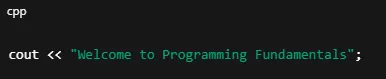
The most common output function in C++ is:
cout: used to print data to the console (screen)- Uses insertion operator
<<
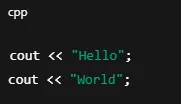
What if we want to use multiple cout in our programs?
We use this syntax:
Input Function in C++:
An input function is used in C++ to get information from the user while the program is running. It allows the user to type data, which the program can then use for calculations or decisions.
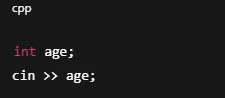
The most common input function in C++ is:
cin: used to read data from the keyboard- Uses extraction operator
>>
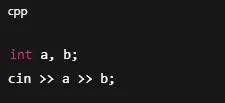
What if we want to take multiple inputs in our programs?
We use this syntax:
Example Program for better Understanding:
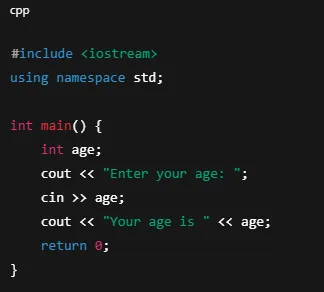
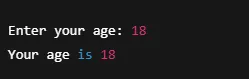
This program simple print the message for user “Enter your age: ” then it uses a cin means the program is taking input from user in a variable called age. The cursor will start blinking to get input age and the cout is used to print the age on screen as:
So, this is the end of crucial concepts in programming of C++.






2 Comments
Ayan aslam
June 3, 2026Plz matric tech subjects class 10
Health science tech
Biology tech
Physics tech
Chemistry tech
Sultan Tutor
June 6, 2026Download all your Tech Books from the Official Link https://pectaa.edu.pk/curriculum-compliance/