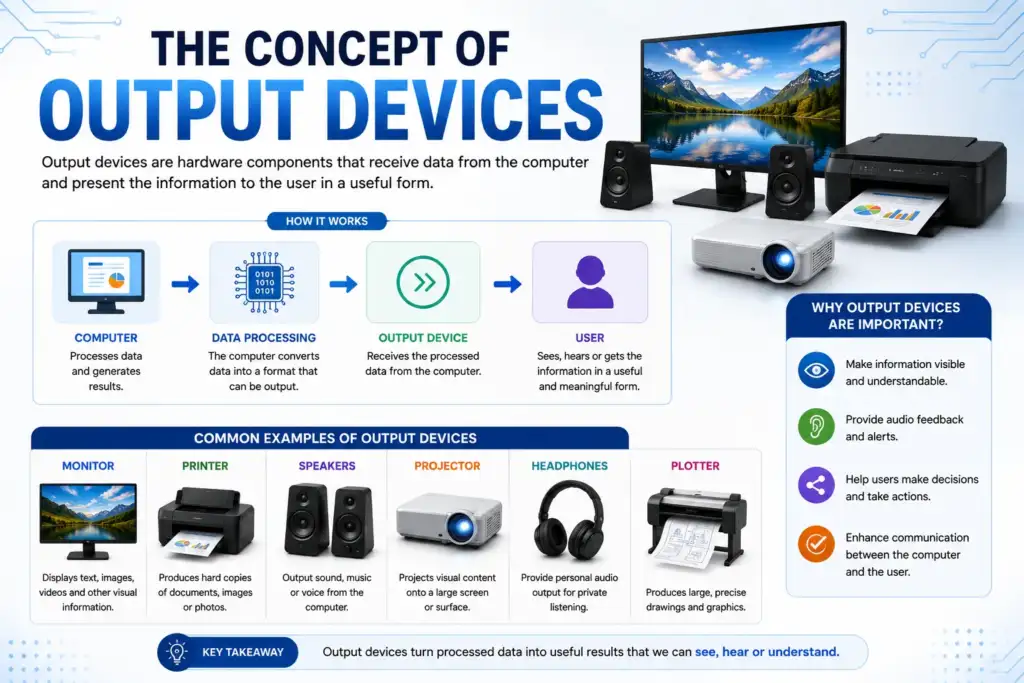

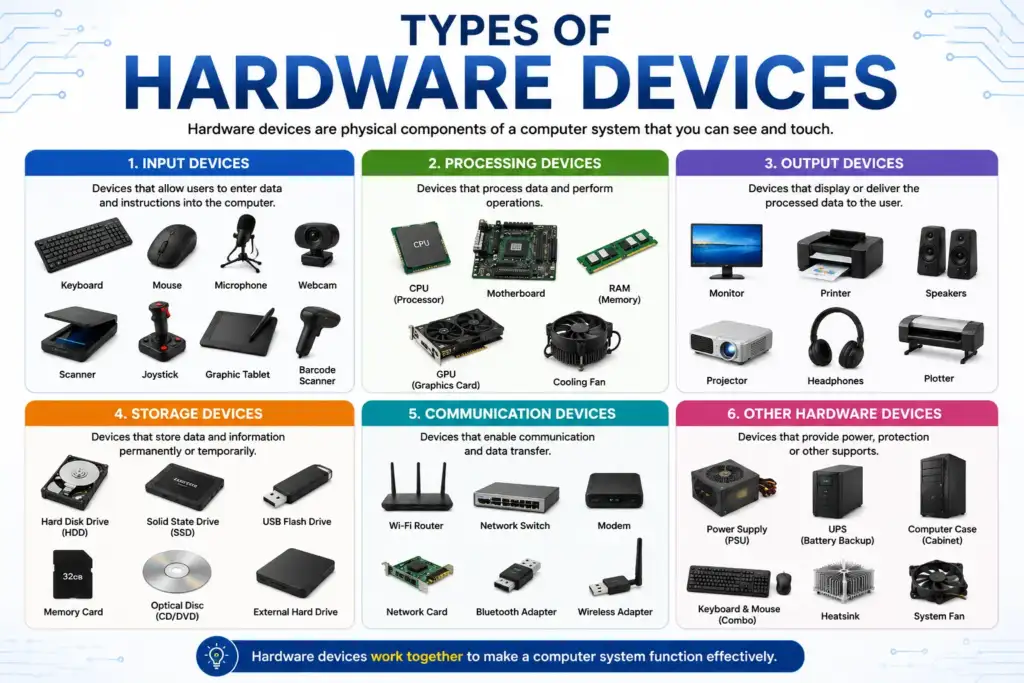
A device that produces human-readable/usable output is known as an Output device. Output Devices are hardware components that receive data from a computer and present the results to the user.
An output device is any hardware device that receives information from a computer and converts it into a form that humans can understand, such as text, images, sound, or printed documents.
Soft Copy and Hard Copy Output
Soft copy output is displayed on a screen or digital medium. It is temporary and disappears once the device is powered off and can include monitor displays, sounds generated by speakers, or images that are projected on a screen. Soft copy output is inexpensive because no physical materials are consumed to produce the output but requires you to have access to the device that produces the output and is ecologically responsible.
Hard copy output is produced on a physical medium such as paper or film or other media that exists as a permanent entity and includes such items as printed documents, printed photographs, etc. Hard copy output is more expensive than soft copy output, contributed to by the cost of the ink or toner and paper, is portable in its final form without requiring electronic hardware to view, and generates more waste in the form of paper and ink.
Monitors and the Types of Monitors
A monitor is the primary device for producing a soft copy output device, which provides visual data on a type of display technology known as a Visual display unit (VDU).
Resolution (i.e., the total number of pixels available; e.g., 1920-H×1080-V = HD)
Refresh Rate (the number of times per second that an image is refreshed on the display, 60Hz is commonly used as the default refresh rat,; 144Hz and above are generally used specifically for gaming).
Aspect Ratio (the ratio of the Width & Height of the screen displayed; common ratios are 16:9, 4:3, or 21:9). There are additional specifications that may be of interest to you including Response Time (how fast a pixel can change to a different colour in milliseconds,lower numbers equate to faster pixel response time) & Colour Depth (the number of colours available for each pixel; for example, an 8-bit vs. A 10-bit colour depth).
Examples of Display Technologies
- CRT (Cathode Ray Tube) is an older form of display technology based on the use of an electron beam with a phosphor screen; still used in some museums and retro gaming systems
- LCD (Liquid Crystal Display) is a type of display that sends liquid crystal images through liquid crystals backlit by fluorescent lighting; generally very thin, use low power, and good for everyday use
- LED – LCD with LED backlighting for increased illumination; designed for general use both in the home and in the office; IPS (In-Plane Switching) display technology designed to provide solid viewing angles of the display and colour accuracy; generally recommended for designers and photo editors
- TN (Twisted Nematic) utilize a TN compatible display due to its short response time and lower cost; typically recommended for use as a gaming display
- VA (Vertical Alignment) provide higher contrast than TN or IPS, therefore generally recommended for consumption of media
- OLED (Organic LED) is the premium form of display technology that generates true black-level and provides true colour reproduction with vibrant colors; generally used for premium televisions & mobile phones.
- The AMOLED display (active matrix organic light-emitting diode) has a quick refresh rate, plus it uses less power when displaying a black screen.
- Plasma displays used electrically charged gas to create light for each pixel. Although plasma displays produce great colors, they are no longer made and their largest application was as a television screen for use in older large televisions.
- Flat panel displays are what most people still think of today as being the standard way to display images on computer monitors.
- Curved monitors provide an enhanced viewing experience while helping to decrease eye fatigue by providing a smooth transition between the edges of the display and the entire image being viewed.
- Ultrawide monitors are designed with an aspect ratio of 21:9 and are best suited for tasks requiring high-level productivity and/or gaming.
- Touchscreens allow users to provide input directly to the monitor using their fingers or other devices. Dual/multi-monitor setups allow users to use more than one monitor to increase the amount of work they can do at their desks.
Printers
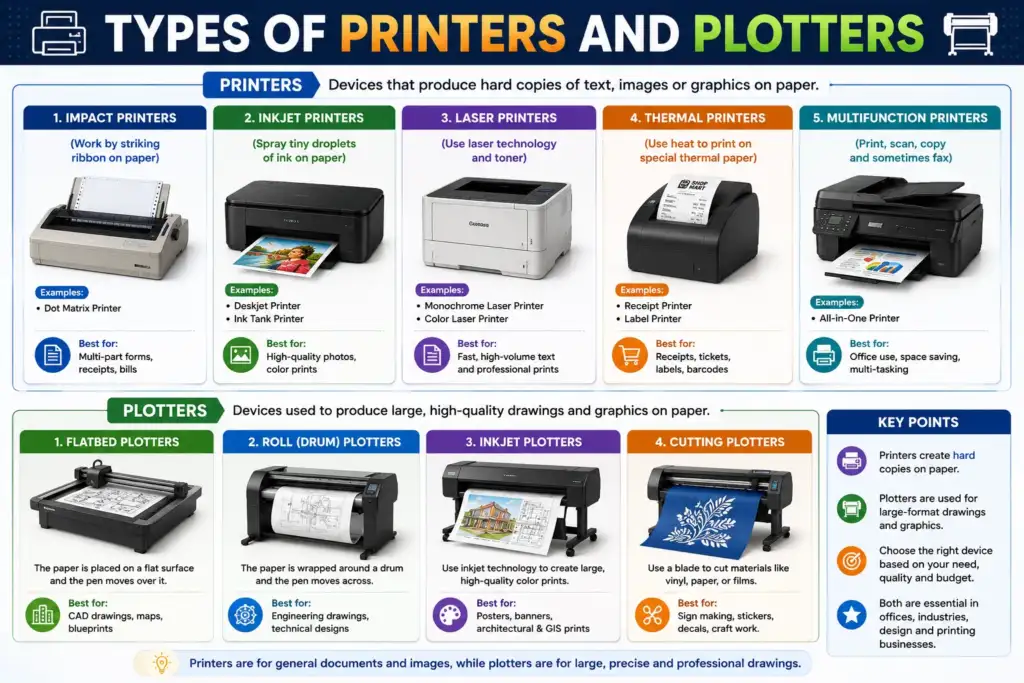
A printer is an output device that produces a hard copy of text, graphics, or images on paper. It receives data from a computer and prints it in a readable form. Printers convert digital images or documents into physical versions by creating copies on some type of media (usually paper).
Impact printers
Impact printers create printed copies by physically striking an ink ribbon against an item you wish to print. Impact printers are printers that produce output by striking a print head or hammer against an inked ribbon, which then presses ink onto the paper. They work in a way similar to a typewriter.
Examples
- A dot matrix printer produces printed images by using pins to strike an ink ribbon, making it one of the slowest methods of printing and typically used for invoices and multi-part forms.
- A daisy-wheel printer produces printed text by using a rotating wheel containing all the letters of the alphabet and produces quality printed text but are now mostly obsolete.
- A line printer creates printed copies at one time across an entire line and is one of the fastest printing methods available and is commonly used in mainframe calculations using computers.
Impact printers have great advantages come from being able to print on carbonless forms (multiple copies) and having a very low cost per printed page. However, disadvantages of impact printers are noise levels, lower quality printouts, and limited graphic capability.
Non-impact printers
Non-impact printers do not physically strike through the paper but instead, rely on other means like heat, inkjet, or light.
Inkjet printers use an inkjet to spray tiny drops of ink onto the paper. They provide great color printing using CMYK cartridges at a high resolution (1200-9600 DPI) and are the best choice for printing pictures and color documents for home use.
The disadvantages of an inkjet printer are that ink can be expensive, and they usually print slow when doing large volumes.
Examples
- Laser printers use a laser beam to charge a drum of toner (powder), which is then attracted to the paper and then adhered to the paper using heat. Laser printers are very fast (20+ pages per minute), with a very nice resolution (600-2400 DPI) and are the best choice for producing high-volume office documents and professional documents. However, the initial cost of laser printers is higher than impact printers, and they don’t produce high-quality prints.
- With direct thermal printing, images are produced without the need for ribbons; the paper itself is changed to create the desired image. Direct thermal printing is often used for printing receipts and labels.
- Thermal transfer printing, on the other hand, uses a wax-based ribbon to melt an image onto a type of paper. This process is used in barcode label printing and medical wristband printing. Both types of printing produce high-quality prints; however, thermal transfer printing is more durable and has a longer lifespan than direct thermal printing.
- LED printers and laser printers both use the same technology to produce prints, but LED printers use an LED array instead of a laser beam. Because of their fewer moving parts, LED printers are less prone to break down and can print faster than laser printers.
- 3D printers build a three-dimensional object layer by layer using digital models as a guide; 3D printers typically use one of three methods to create a 3D object: FDM (Fused Deposition Modeling), SLA (Stereolithography), or SLS (Selective Laser Sintering). 3D printers are used primarily for designing prototypes and manufacturing and creating models for medical purposes.
- Dye-sublimation printers use heat and pressure to transfer dye from a dye-sublimation film to various substrates such as paper, cloths, and plastics. As a result, dye-sublimation printers are utilized primarily for printing photographs, producing ID cards, and producing material like clothing. Dye-sublimation printers produce high-quality pictures or images with continuous tone and photo-realistic output, making them highly desirable for many applications.
Dot matrix printer has poor quality, slow speed, limited colours, cost per page is low, has high noise, and is good for forms and invoices. Inkjet printer has excellent quality printing, medium speed, excellent colour, high cost per page, low noise, and is good for photographs and home use. Laser printer has excellent quality printing, fast speed, good colour, very low cost per page, low noise, and is good for offices with high-volume printing. Thermal printer has fair-quality printing, fast speed, limited colours, very low cost per page, very low noise, and is good for printing receipts and labels.
Plotters
Plotters are specialized output devices that render vector graphics, made from lines using pens, cutting tools or similar instruments, onto paper or other media. Unlike printers, which print using dots as the smallest unit of discrete output, plotters indicate a continuous line, which makes them well suited for producing technical drawings.
Types of Plotters
- A drum plotter is paper wrapped around a rotating drum while the pen moves along the x-axis. This type of plotter produces very long output and is used primarily in the fields of engineering and architecture.
- Flatbed plotters are devices that use flat beds to hold the media (usually a sheet of paper) while the pen arm will move along both X and Y directions to create an image on the media. Flatbed plotters are very accurate, work great for large scale drawings, and are commonly used for CAD or CAM designs, circuit board layouts, and/or other similar designs.
- Pen plotters use real physical ink pens to draw images onto pieces of paper. Many pen plotters can utilize more than one ink pen at a time in order to provide different colors of ink. Pen plotters are also considered to be a more traditional form of plotter. Large format inkjet printers have replaced pen plotters for the most part, but some people still utilize them to print out larger sized images.
- Inkjet plotters (large format printers) are modern plotters that use inkjet printing technology to print large images on wide rolls of paper. Large format inkjet printers are used primarily for printing posters, banners, architectural blueprints, and geographic maps (e.g., GIS maps). The HP DesignJet series is one example of a large format inkjet printer.
- Cutting plotters (also known as vinyl cutters) utilize a blade instead of a pen to cut designs from either vinyl or paper. Cutting plotters are used primarily for creating signs, stickers, vehicle wraps, and/or apparel designs.
- Electrostatic plotters utilize an electrostatic charge to attract toner to the paper and are therefore very fast and can produce large quantities of technical drawings.
Applications of plotters include architectural floor plans and blueprints, engineering CAD/CAM drawings, geographic maps (GIS), PCB designs, textile patterns, and sign/advertising graphics.