
Computer Facility Management
A computer facility, which may be a small laboratory or an enormous data center for corporations, as well as a university computer lab, is a rather complex system that requires appropriate planning, organization, and management.
What is a Computer Facility?
A computer facility is a specific place where one finds all the necessary equipment related to computing technologies and their infrastructure , all intended to meet the demands of its users.
Examples of computer facilities include:
- Computer laboratories, training rooms (education)
- Rooms within enterprises, server closets
- Data centers
- Internet cafes and library computer access rooms
- Computer research labs and facilities
- Computer centers of the government and defense
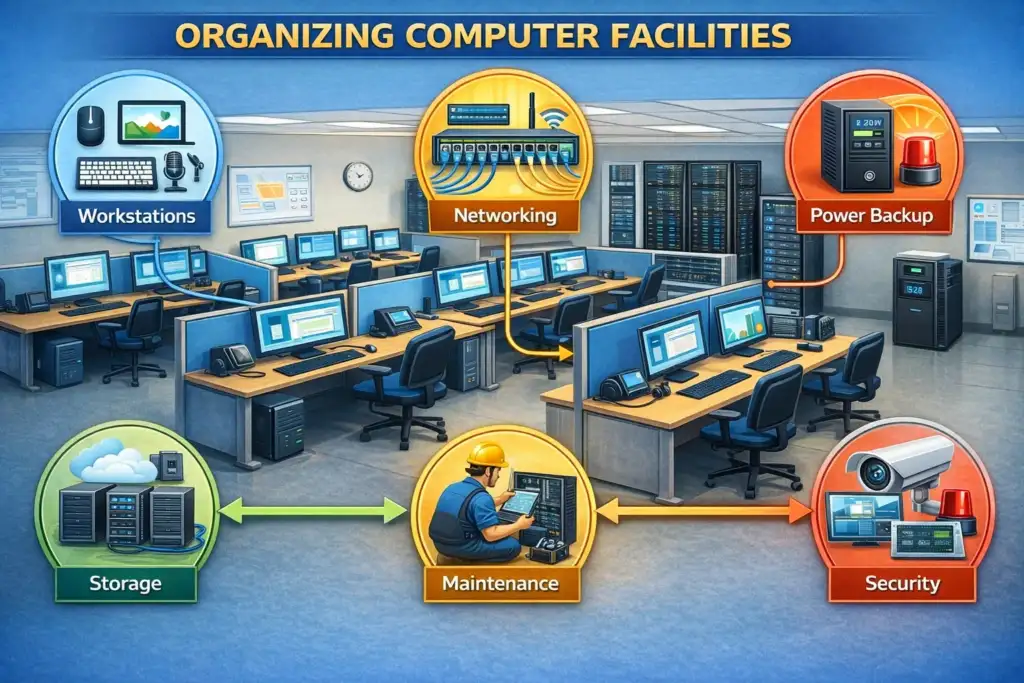
Objectives for Planning a Computer Facility
- Achieve maximum uptime
- Provide physical and cybersecurity protection
- Optimize utilization of space and resources
- Make it possible for further scaling
- Decrease operating costs
- Guarantee comfortable conditions for users and IT specialists
- Comply with all the legal requirements.
Computer Facilities Management
- The number of simultaneous users and the busiest periods
- The nature of work to be done (general purpose, design, programming, gaming, and research)
- Software and hardware requirements
- Internet connection and network bandwidth
- Budget and purchasing considerations
- Requirements for people with disabilities
- Predicted growth over the next 5 to 10 years
Space Planning and Layout
- Provide at least 1.5 to 2 square meters per user for optimal performance
- Allocate additional space for aisles, emergency exits, and access by technical staff
- Arrange cable paths prior to furniture placement
- Raised flooring should be considered in data centers, where cable routing will be done below the floor
Workstation Layout Options
Layout Optimum Application and Features
Row Layout Classroom and training facilities; best capacity utilization; simple
Ergonomics Issues
- Desk height: 70-75 cm for normal usage; desks with height adjustment preferable
- Monitor location: 50-70 cm from the user’s eyes; screen top at eye level
- Lumbar support and adjustable armrests in chairs; five-leg base chair
- Proper keyboard and mouse placement to prevent RSI
- Anti-glare screens and appropriate lighting to ease eye strain
Power Infrastructure AND Power Consumption
- Estimate total power consumption: sum of all the device wattages at full consumption +25%
- Separate circuits for heavy-duty machinery (servers, workstations, projectors, etc.)
- Labeled, colored outlets by circuit type
- Adequate number of outlets per workstation (minimum 4 outlets per desk advisable)
- Correct grounding of all machinery
Power Protection
Cooling and Power — Two Basic Requirements You Can’t Ignore Computer systems create a lot of heat and must have a constant supply of power without interruptions. These are indeed the two most relevant physical requirements to hardware failure and data loss that you can prevent with good planning and upkeep.
- Use UPS on all critical systems and processes
- Each workstation is equipped with surge protectors
- Data centers and round-the-clock establishments have generator backup power supply
- ATS installed to switch off one power supply and engage another automatically
- Regular load tests conducted on UPS and generator backup systems
Power Redundancy In critical installations and data centers, N+1 or 2N power redundancy must be maintained,
meaning there must be at least one additional power path for each existing one.
Cooling and Environmental Controls AND Temperature and Humidity
- Recommended operating temperature range: 18-27ºC (65-80°F)
- Recommended relative humidity range: 40-60%
- Server room and data center temperature: maintain 18-21°C with precise control
- Implement temperature and humidity monitoring with automatic alerts
Cooling Mechanisms
- Utilize CRAC (Computer Room Air Conditioner) systems for dedicated server rooms
- Managing Computer Facilities
- Implementation of hot/cold aisles in data centers to improve cooling efficiency
- Use of in-row cooling for high-density servers
- Raised floor plenum with under-floor cooling for servers
- Maintain sufficient space for air flow: one meter in front and behind server racks
Hardware Organization and Inventory Management
- Determine workstation specifications to be standardized for each user level (basic, medium, advanced)
- Decide on the acquisition cycle (usually between 3 to 5 years for workstations)
- Maintain connections with several manufacturers in case of emergencies
- Prepare request for proposals in case of bulk acquisition
- Note the expiry dates of warranties on all hardware
Hardware Identification and Inventory
- Tag every piece of hardware with a unique identification tag (bar code, QR code or RFID)
- Identify asset name, manufacturer, model, serial number, date of purchase, warranty expiry, location, and user
- Attach a tag to both hardware and original box
- Utilize an asset management software solution like ServiceNow or create a customized database
- Inefficient cable management can cause a number of issues including air flow disruptions, accidental disconnections, and trouble troubleshooting.
Security
Often regarded as either purely digital—that is, antivirus, firewalls—or purely physical—that is, locks, cameras.
Actually, both layers are related. The most advanced firewall is useless if an ,an unauthorized person mightgo into the server room and takeaway a hard disk. Equally, most
Secure building offers little defense against ransomware downloaded through a phishing email.
Physical Protection
• Entry to the building—especially to server rooms—should be limited to permitted staff using electronic access control—thatis, keycards, PIN pads, biometrics. Every entry and exit has to be recorded together with a userID and timestamp.
• CCTV monitoring at equipment rooms and all entrances and exits helps to prevent stealing and offer proof of events. Footage should be kept at least 30 Days. Equipment lockingcalls Kensington locks or deskanchors. Individual cabinet locks are required on server racks. This stops opportunistic theft even after someone gets room permission.
Visitor Management: All guests should be logged always. Tailgating: following someone through a locked door without using credentials hasto be actively
interrupted.
Cybersecurity
Endpoint Protection: EDR (Endpoint Detection and Response) and business antivirussoftware across every device. A facility benefits little from consumer-gradefree antivirus.
setting.
• firewall and network segmentation: hardware firewall at the perimeter of the network .Using VLAN separation for users, servers, and guests. A gadget that is contaminated on a Guest VLAN cannot access the server VLAN.
• Robust authentication calls for the use of multi-factor authentication by administrators. All Policy should require strong passwords on user accounts. Shared or default without exception, passwords are banned.
• All portable computers and laptop sneed full-disk encryption permitted. Unencrypted stolen laptops give the thief complete access inside to all of its data.
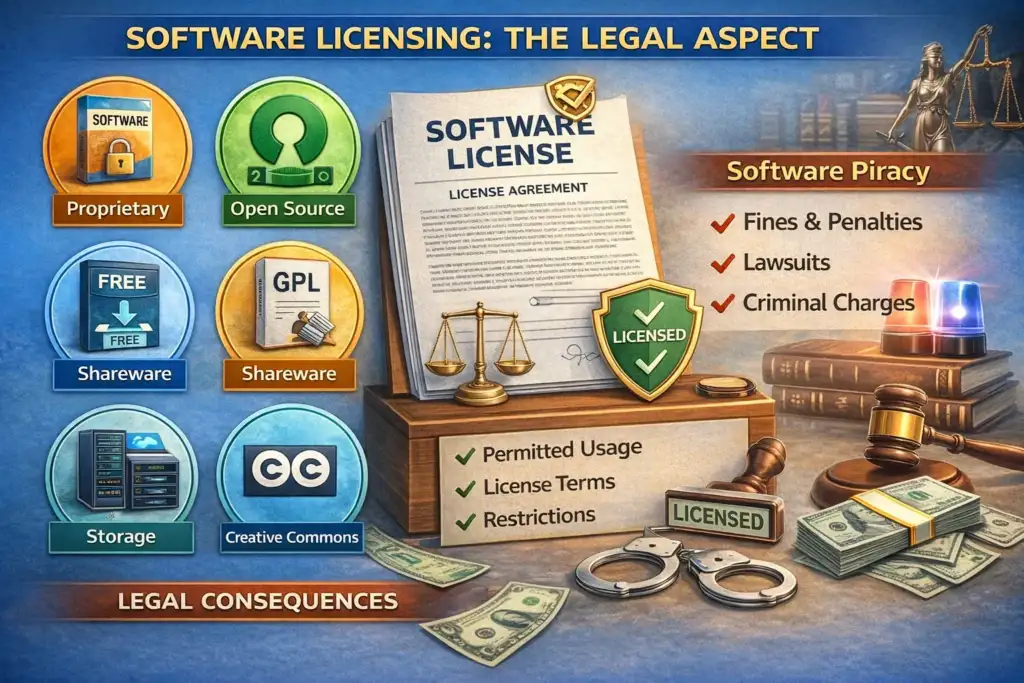
Software Licensing: The Legal Aspect
Use of unlicensed copies of software is against the law and is considered software piracy. Organizations can be fined, sued, and suffer reputational harm as a result of using unlicensed software. All major software vendors (Microsoft, Adobe, Autodesk, etc.) conduct regular audits of their customers. Ignorance of licensing requirements or laws does not protect you from prosecution, and there are very large monetary penalties if you are found guilty.
Managing Software Licenses
- Conduct a complete inventory of software installed on each machine – you must know what software is installed on each computer. For large organizations, scanning each computer may not be a practical solution, so use a tool, such as Software Asset Management (SAM), to automatically scan the enterprise network and to report installed applications to a central database.
- Track software licenses for every software package by recording: the type of license, total number of licenses issued, license expiration date, name of vendor, documentation showing the date of purchase, etc. Store all license information in a central repository that has access controls and is regularly backed up.
- Block unauthorized installations of software using application controls. Use the approved and installed software lists to audit your environment against all installed software. All unlicensed software must be removed from your organization immediately upon discovery through the audit.
- For organizations that manage a large number of computers, use a volume license agreement to acquire software from a vendor. Volume licensing provides a more favorable price per unit and simplifies compliance tracking.
Testing Backup
Testing Backup Procedures Is Critical Backups are now an accepted method for securing data, but they cannot prevent data loss if proper backup testing procedures are not implemented or in place first. The best way to test your company’s backup is to follow these backup testing requirements mentioned below: The 3-2-1 Backup Method • Three Different Copies: There should be at least three different copies of all critical information, including your live data and two backups. • Two Different Media: Backups must be created using two different types of media (e.g., Local NAS Drive and Cloud Storage) to ensure disaster recovery from media and natural disasters (such as fire, flood, and theft). • One Off-Site Copy: There should be at least one off-site backup to protect against natural calamities that might prevent you from recovering your data from the premises. The off-site copy is just as vulnerable to fire, flood and theft as any other area on the premises.
Testing Backup Requirements
- Monthly restoration testing – Each month, select a random sample (but large enough) of backed-up data and conduct a full restoration of that data to a test environment. Ensure that the restored data is complete (as originally) and not corrupt and usable. Anything less than this, is not sufficient.
- Annual Full DR Drill – Conduct a once-a-year drill simulating the complete loss of the production site and reconstructing from backups only. This testing will identify gaps in the recovery process which cannot be identified in any other way.
- Automated Verification – Configure backup systems to automatically verify data integrity after each run, and provide alerts if there are any failures. Do not rely on manual verification only.
Common Backup Failures:
- Backup job silently failing for weeks and no one sees the alerts.
- Backup jobs completing, but the data is corrupted or incomplete.
- No documented recovery process; when backups are needed, no one knows how to use them.
- Recovery time too long; backups exist but taking 3 days to restore them when there is a 4-hour tolerance.
Prepare for Tomorrow, Not Just Today
A building designed with only today’s needs in mind will soon be outdated and require costly redesigns in just a few years. Technology changes at a fast rate: Bandwidth demand doubles approximately every few years, storage demand has grown exponentially, and new types of services are regularly introduced for which no infrastructure existed when the facility was originally constructed.
- Annual Technology Review: Each year, review the technology used at your facility against today’s and the future’s standards. Determine what needs to be replaced, upgraded, or added within the next 1 to 3 years. Surprises that occur are evidence that a facility missed its planning.
- Network and Power Expansion Capacity: Your facility should have the cabling built-out to accommodate at least twice the current number of ports. Schedule the electrical and cooling system for capacities at a minimum of 150% of the current load. While adding headroom during the initial installation may be a minor incremental cost versus retrofitting later, the costs of retrofitting can be substantial.
- Cloud and Hybrid Strategies: Determine which workload belongs in a cloud computing environment (email, file backup, software delivery, etc.) and which workload should be hosted locally (applications with higher demands on latency, data requiring higher levels of security). Many hybrid models will provide the best cost, performance and resiliency.
- Emerging Standards: Read and monitor the new standards (Wi-Fi 7, multi-gigabyte Ethernet, NVMe storage and AI/ML) and prepare for how your facility will function in comparison with these new standards. Facilities that do not prepare for the new standards will incur significant costs to catch up, and they may not have the option to defer compliance.
- Certification Programs: IT employees should have the appropriate certifications that pertain to the positions they occupy: CompTIA A+ and/or Network+ and/or Security+; Cisco CCNA; Microsoft Certified Credentials. Certifications demonstrate an established level of competency and provide structure in developing beyond that competency on an ongoing basis.
- Cross-Training: At least two (2) staff employees person must know how to perform any critical function. If there is only 1 person that knows how to restore backups or configure the firewall, every time that employee is unavailable poses a risk to the facility.
- Hardware Refresh Cycles: Workstations every 3-5 years; servers 5–7 years. Create a multi-year capital budget; this will allow funding for a replacement of the hardware to be spread evenly over the life of the hardware instead of incurring 1 enormous replacement expense when the hardware is due to be replaced.
The Consequences of Not Planning for the Future
✔ The emergency purchase price of hardware can be 20-40% greater than the normal procurement price.
✔ Legacy equipment, that has exceeded its refresh date, experiences more frequent failures at the most inopportune time.
✔ Employee skillsets that have not been properly developed will leave the organization for an employer that has a commitment to their employee’s development.
✔ Facilities that do not keep pace with technology will continually incur compounding costs due to being required to play “catch-up” technolog






2 Comments
Ayan aslam
June 3, 2026Plz matric tech subjects class 10
Health science tech
Biology tech
Physics tech
Chemistry tech
Sultan Tutor
June 6, 2026Download all your Tech Books from the Official Link https://pectaa.edu.pk/curriculum-compliance/