

Turbo C++ is famous for its simplicity, classic blue interface, and ease of use, which is why many beginners still use it today for understanding core programming concepts. It is one of the oldest and most well-known IDEs used by students, especially in schools and colleges, for learning the basics of C and C++ programming.
This guide is ideal for programming beginners, students, and learners who want to understand C/C++ fundamentals. In this guide, we’ll cover everything about Turbo C++ including what Turbo C++ is, why it became popular, its features, installation steps, limitations, and whether it’s still useful in 2025.

What is Turbo C++?
Turbo C++ is a C and C++ compiler and IDE developed by Borland. It allows users to write, compile, run, and debug C and C++ programs in a single environment.
Turbo C++ was widely used in the 1990s and early 2000s and became extremely popular in educational institutes due to its simple interface and fast compilation. Even though Turbo C++ is outdated today, it is still used in some institutions to teach basic programming logic.
Why Turbo C++ is most popular?
Turbo C++ gained popularity mainly because of its simplicity and low system requirements. During its peak time, computers were limited in power, and Turbo C++ worked perfectly even on very low-end machines.
Here’s why students and teachers preferred Turbo C++:
- Very easy to install and use
- Runs smoothly on old computers
- Simple and distraction-free interface
- Fast compilation speed
- No complex setup required
- Ideal for beginners learning logic
- Widely used in schools and colleges
Because of these reasons, Turbo C++ became a standard teaching tool for C/C++ programming in academic environments.

Key Features of Turbo C++:
Even though Turbo C++ is an old tool, it offers several useful features for beginners.
1. Code Editor:
Turbo C++ provides a basic built-in editor with features like:
- Syntax highlighting (limited)
- Easy navigation using keyboard shortcuts
- Simple menu-driven interface
- Clear error messages for beginners
This helps students focus on learning programming logic rather than dealing with complex tools.
2. Compiler:
- Comes with a built-in Borland C++ compiler
- Compiles code very quickly
- Ideal for basic C and C++ programs
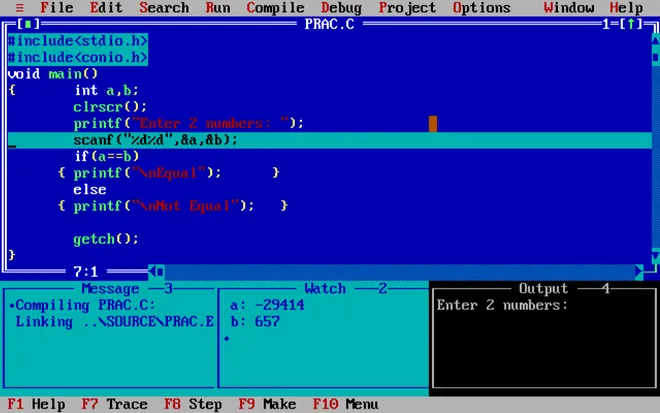
You can compile and run programs directly inside the IDE.
3. Debugging Support:
- Supports basic debugging
- Helps find syntax and logical errors
- Useful for understanding how programs execute step by step
4. Lightweight and Fast:
- Extremely lightweight
- Uses very little RAM and storage
- Runs smoothly on old systems
- No powerful hardware required
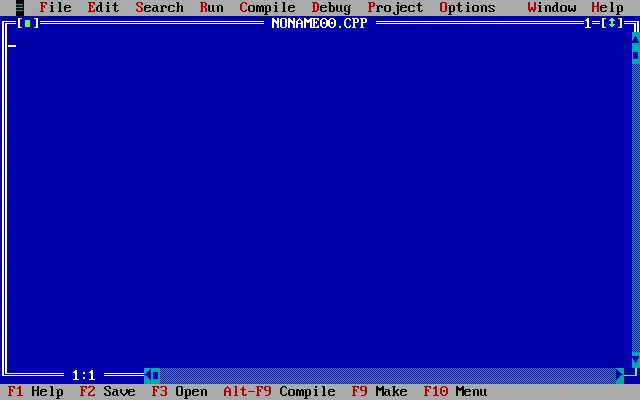
5. DOS-Based Interface:
- Classic blue screen interface
- Keyboard-friendly controls
- Minimal distractions for beginners
This makes it perfect for students who want to focus purely on coding basics.
How to install?
Installing Turbo C++ is very simple. Follow these steps:
Step 1: Download Turbo C++:
Download the Turbo C++ setup (usually comes in ZIP format).
Step 2: Extract the Files
Extract the ZIP file to C:\TurboC (recommended).
Step 3: Run the Application
Open the TC.exe file inside the BIN folder.
Step 4: Configure Path (Optional)
Some versions automatically configure paths. If needed, set the directory paths from the Options → Directories menu.
Step 5: Start Coding
You are now ready to write and run C/C++ programs.
Limitations of Turbo C++:
Although Turbo C++ is good for beginners, it has many limitations in modern programming environments.
1. Very Old Compiler:
Turbo C++ does not support modern C++ standards such as:
- C++11
- C++14
- C++17
- C++20
Many modern features will not work.
2. Outdated Interface:
The interface looks very old compared to modern IDEs like:
- Visual Studio Code
- CLion
- Code::Blocks
3. No Support for Modern Libraries:
Turbo C++ does not support modern libraries like:
- STL (fully)
- Boost
- OpenGL (properly)
This limits advanced project development.
4. Runs in DOS Environment:
Turbo C++ runs in a DOS-based environment, which is not suitable for modern Windows systems without additional setup.
5. Not Suitable for Real-World Projects:
Turbo C++ is only good for:
- Learning basics
- Academic practice
It is not recommended for professional or real-world software development.
Is Turbo C++ Good Choice in 2025?
Yes, if:
- You are a complete beginner
- Your school or college requires it
- You want to understand basic programming logic
No, if:
- You want to build real-world applications
- You want to learn modern C++
- You plan to work on large or professional projects
For modern development, better alternatives include:
- Visual Studio Code
- Code::Blocks
- CLion
- Dev-C++






2 Comments
Ayan aslam
June 3, 2026Plz matric tech subjects class 10
Health science tech
Biology tech
Physics tech
Chemistry tech
Sultan Tutor
June 6, 2026Download all your Tech Books from the Official Link https://pectaa.edu.pk/curriculum-compliance/