

If you’ve just started learning C or C++ programming, chances are you’ve come across Dev-C++. It’s one of the most lightweight and beginner-friendly IDEs (Integrated Development Environments), popular among students and new developers for many years.
Dev-C++ is known for its fast speed, simple interface, and quick setup process, which is why many people still use it today for writing and compiling C/C++ programs.
This guide is ideal for programming beginners, students, and anyone interested in C/C++ coding software. In this , we’ll cover all the basics of Dev-C++ including what Dev-C++ is, why it’s still useful, its main features, how to install it, its pros and cons, and whether it’s a good choice for programmers in 2025.
What is Dev CPP?
Dev-C++ is a free and open-source IDE (Integrated Development Environment) used for writing, running, and fixing C and C++ programs. It was first created by Bloodshed Software and later updated by Orwell. Now, newer versions like Embarcadero Dev-C++ offer better features and modern updates.
Dev-C++ uses a compiler called MinGW (Minimalist GNU for Windows), which helps convert your code into a working program. It also supports GCC (GNU Compiler Collection), one of the most popular and trusted compilers used by programmers all over the world.
This IDE is simple to use, making it a great choice for beginners learning C or C++ programming.
Why Dev CPP became so popular?
The main reason Dev-C++ is still widely used is because of its simplicity and speed. While many other coding tools are heavy or complicated, Dev-C++ stays lightweight and easy to use, especially for beginners.
Here’s why students and teachers prefer Dev-C++:
- Easy and quick to install
- Works well even on low-spec computers
- Clean and simple layout for writing code
- Fast compilation of C and C++ programs
- Uses very little storage space
- Completely free and open-source
- Perfect for beginners in programming
Because of these benefits, Dev-C++ has become a favorite choice in schools, colleges, and coding classes, especially for those just starting with C/C++ programming.

Key Features of Dev-C++:
Even though Dev-C++ is a light and simple tool, it still offers many helpful features that make programming easier and more efficient. Here’s a breakdown of its main features:
1. Code Editor:
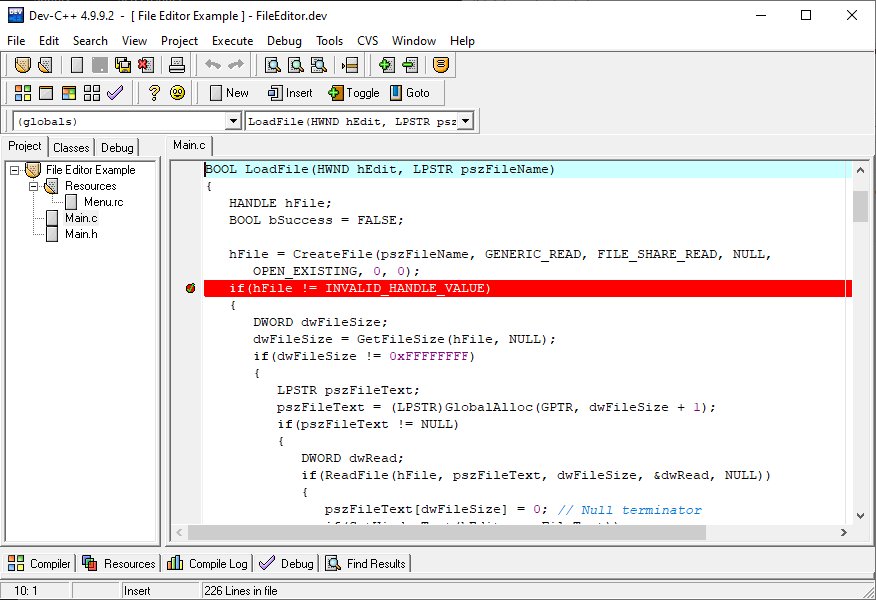
Dev-C++ has a built-in editor with useful tools like:
- Syntax highlighting (colors your code for better visibility)
- Auto-indentation (keeps code neatly aligned)
- Bracket matching (helps you find opening and closing brackets easily)
- Code folding (lets you hide or show code sections)
- These tools help you write clean and easy-to-read code.
2. Compiler and Debugger:
- Uses MinGW GCC to compile C/C++ code
- Has a GDB debugger to find and fix errors
- You can run and test your programs with just one click.
3. Project Management:
- Supports multi-file projects
- Helps organize code into header and source files
- This is great for creating bigger programs.
4. Customizable Interface:
- Themes
- Font sizes and colors
- Window layout
- This makes your coding environment more comfortable.
5. Lightweight and Fast:
- Quick to install
- Uses less memory
- Works well on old or basic computers
- Doesn’t required powerfull PC/Hardware
6. External Library Support:
You can add popular libraries like:
- SDL (for games)
- OpenGL (for graphics)
- Boost (for advanced C++ functions)
This lets you create more advanced projects beyond basic programs.
How to Install?
Installing Dev-C++ is extremely easy. Follow these steps:
- Step 1: Download the Setup from below given link.
- Step 2: Run the Installer
- Double-click the EXE file.
- Step 3: Choose Your Language
- Select English (or any preferred language).
- Step 4: Accept the License Agreement
- Step 5: Choose Installation Folder
- The default location is: C:\Program Files (x86)\Dev-Cpp
- Step 6: Select Components
- Choose:
- Dev-C++
- MinGW compiler
(Recommended)
- Choose:
- Step 7: Complete the Installation
- Click Finish and launch the IDE.
Limitation of Dev CPP:
Although Dev-C++ is helpful for beginners, it does have some downsides:
1. Old-Looking Design:
The interface looks outdated when compared to modern tools like Visual Studio Code or CLion.
2. Limited Support for New C++ Versions:
Some older versions of Dev-C++ do not fully support the latest C++ standards like:
- C++17
- C++20
This means newer features may not work properly. However, newer versions (like Embarcadero Dev-C++) have made improvements.
3. Not Great for Big Projects:
Dev-C++ can handle small to medium projects, but it lacks advanced tools such as:
- Smart code suggestions
- Code refactoring tools
- Real-time error checking
These are useful for large or complex software development.
4. Works Only on Windows:
Dev-C++ is designed mainly for Windows. If you’re using Linux or Mac, better options include VS Code or Code::Blocks.







2 Comments
Ayan aslam
June 3, 2026Plz matric tech subjects class 10
Health science tech
Biology tech
Physics tech
Chemistry tech
Sultan Tutor
June 6, 2026Download all your Tech Books from the Official Link https://pectaa.edu.pk/curriculum-compliance/